PerpGuard · for Hyperliquid apps
Keep your traders alive. Earn on every save.
A liquidated user leaves your app and takes his volume with him. PerpGuard is the liquidation protection your users switch on in one tap — measured, non-custodial, and it pays you on every rescue.
What it does
When an account approaches its liquidation price, PerpGuard closes a piece of the position — just enough to push the danger away — and gives it back when the danger passes. The trader stays in his trade. A stop-loss takes him out for good; this keeps him in.
It reads the whole account, not one pair. In cross margin people do not die from one coin, they die from a correlated move. No stop-loss sees that coming. The ladder is recomputed every fifteen minutes as the account's leverage and positions change.
Measured, not promised
5,793 account-weeks of real Hyperliquid positions, replayed through three separate weeks of real order books:
Two rules do most of that: it only ever spends money the account has already made, and no single order it places can cost more than 2% of the user's stake in slippage.
And it works live, not only in replay. Every account flagged near liquidation is published, with what happened to it next, checked against the exchange's own liquidation records:
The full record, day by day → No account address is ever published.
Same account. Same crash.
One real Hyperliquid account, replayed through a real crash. Without protection it is liquidated within hours. With PerpGuard it bends, holds, and finishes above where it started.
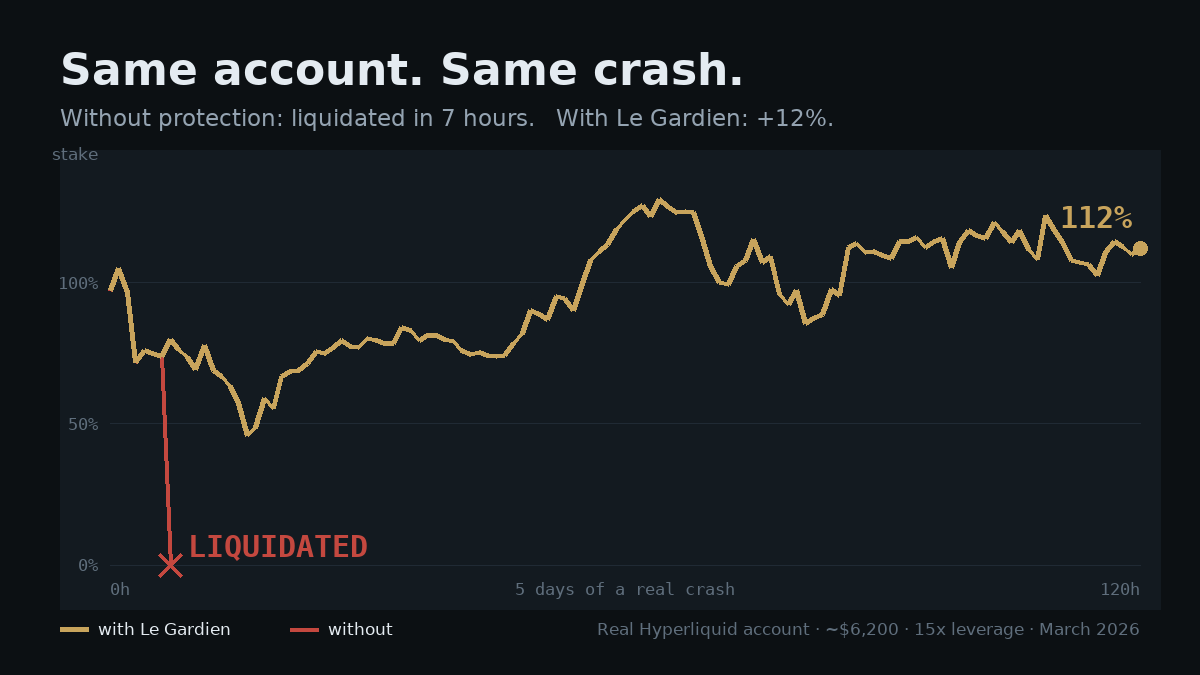
Not a lucky pick. Across the four real crashes we replayed, 100 accounts that would have been liquidated came out alive with more than half their stake. This one is the typical rescue, not the record.
Why your users can trust it
- No key is ever handed over. Your user signs two messages. One authorises an agent that can place orders on his behalf; Hyperliquid itself forbids that agent from withdrawing a single dollar. It is a protocol guarantee, not a promise from us.
- The fee is capped by the protocol and approved by the user in the second signature.
- Revocable in one click, at any time, from the user's own wallet.
- Both signatures are validated against the live exchange.
What it earns you
Measured on the real Hyperliquid population, a leveraged account in the danger zone is worth on average about $12,800 a year in protection commission. You get 30% of it, for life, on every user you bring — paid only on commission actually collected on chain, so every dollar can be audited by you.
| Your builder fee | Protection fee | |
|---|---|---|
| Charged on | your users' own trades | only the rescue orders we place |
| Who keeps it | you, 100% | shared — 30% to you |
| Overlap | none: two different order flows | |
The 30% is our standard rate. Deeper integrations are discussed case by case.
Two ways to plug it in
Live today
A link, zero engineering
You get a partner code. Every user who arrives through a link carrying it is attributed to you permanently — even if he leaves and comes back days later.
/?ref=YOURCODE
Put it in your app, your docs, your community. The first partner who brings a user keeps him.
Live today
Inside your app
A “Protect my account” switch in your own interface. Your app asks for the two signatures through the wallet it already connects, and passes them to our API with your code. We run the protection; your user never leaves you.
Five calls, callable straight from your frontend, with a sandbox to try them against your own wallet.
Before any of that: take our data, free
You show your users when an account is close to liquidation. We have re-read leveraged accounts on Hyperliquid every few minutes since August — 40 million position snapshots across 87,000 addresses — which is what it takes to say how much of the market is near the edge right now, and how that compares to yesterday. That number is yours, free, no account, no key, no integration:
curl https://www.perpguard.com/api/v1/market/dangerIt returns how much notional sits within 2, 5, 10 and 20% of liquidation, the breakdown by asset, and the liquidations of the last 24 hours. No address is ever in it. Display it wherever you like — a banner, a widget, a daily post — the only thing we ask is a visible link back.
Every response carries a coverage block, and you should publish
it with the number: the figures cover the positions we re-read in the last six
hours, which is a few percent of the notional Hyperliquid’s published open
interest implies, and our reading order deliberately favours accounts already
close to their liquidation price. So these are floors, never totals — and
we would rather you could answer that question yourself than be asked it by one
of your readers.
Or, if you would rather not write anything at all — one line, and a live box appears on your page, updating itself every two minutes:
<script src="https://www.perpguard.com/widget.js" async></script>See it. Add
data-theme="light" for a light page, data-view="full"
for the four brackets, and data-ref="yourname" so the clicks it
sends us are counted as yours. It carries no field, reads no address and
touches no wallet — it is the one page on this site we allow to be
framed, and that is why.
And the same thing as a picture, redrawn every hour, ready to post:
<img src="https://www.perpguard.com/danger.png" alt="Hyperliquid liquidation risk">See today's — four buckets, where the risk is massed by asset, and the hour it was read. Nobody's address is in it.
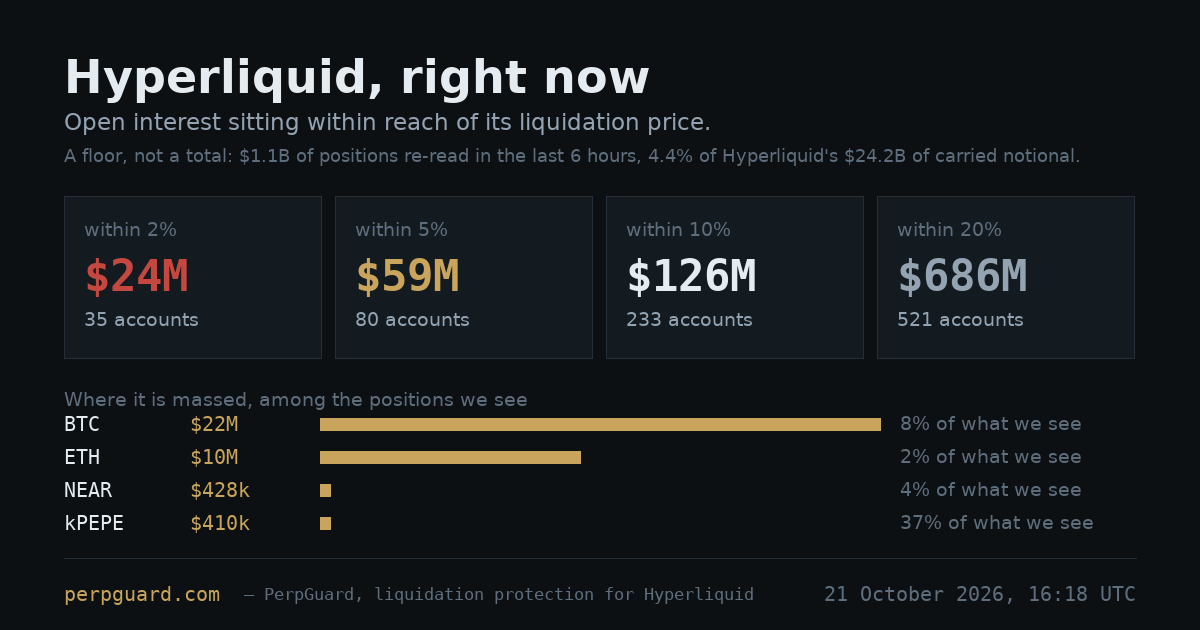
Why we give it away: your users are the accounts this protects. A number you show every day introduces us better than any message we could send them. The protection below is the same relationship, one step further.
The API, in five calls
Plain JSON over HTTPS, callable directly from your frontend (CORS open on these routes). Nothing here relies on cookies or sessions: every step that commits an account is proven by its owner's signature, in his own wallet.
| Step | Call | What it does |
|---|---|---|
| 1 | POST /api/v1/partner/session{"partner", "address"} |
Opens an enrollment for your user and attributes him to you. Returns a token — or, if he is already protected, "token": null and his status. |
| 2 | POST /api/v1/partner/enroll/agent-request{"token", "account"} |
Returns the agent approval to sign: an EIP-712 message, ready for your wallet connector. |
| 3 | POST /api/v1/partner/enroll/agent-submit{"token", "action", "message", "signature"} |
Submits the signed approval to Hyperliquid. |
| 4 | POST /api/v1/partner/enroll/fee-requestthen …/fee-submit |
Same pattern for the fee approval, capped by the protocol. Protection arms here. |
| 5 | GET /api/v1/partner/status?address= |
not_enrolled, agent_approved or protected — to show the state in your UI. |
One account, one protection: a trader who uses two partner apps is never protected twice. The first partner who brought him keeps him.
The whole integration, copy–paste
This is the entire “Protect my account” button. It uses the wallet your app already has connected — below, any EIP-1193 provider (MetaMask, Privy, Rabby, WalletConnect); swap in wagmi or viem if that is your stack. No SDK, no key, no server of yours involved.
const GARDIEN = "https://www.perpguard.com";
const PARTNER = "yourcode";   // we issue it

async function post(path, body) {
  const r = await fetch(GARDIEN + path, {
    method: "POST",
    headers: { "Content-Type": "application/json" },
    body: JSON.stringify(body)
  });
  const out = await r.json();
  if (out.error) throw new Error(out.error);
  return out;
}

// sign one EIP-712 payload with the user's own wallet
async function sign(provider, account, message) {
  return provider.request({
    method: "eth_signTypedData_v4",
    params: [account, JSON.stringify(message)]
  });
}

export async function protect(provider, account) {
  // 1. open a session — this is also what attributes the user to you
  const { token, status } = await post("/api/v1/partner/session",
                                       { partner: PARTNER, address: account });
  if (!token) return status;            // already protected, nothing to do

  // 2 + 3. the agent approval: it can trade, it can never withdraw
  const agent = await post("/api/v1/partner/enroll/agent-request",
                           { token, account });
  await post("/api/v1/partner/enroll/agent-submit", {
    token, action: agent.action, message: agent.message,
    signature: await sign(provider, account, agent.message)
  });

  // 4. the fee approval: a capped rate, charged only when we save him
  if (agent.fee_step) {
    const fee = await post("/api/v1/partner/enroll/fee-request",
                           { token, account });
    await post("/api/v1/partner/enroll/fee-submit", {
      token, account, action: fee.action, message: fee.message,
      signature: await sign(provider, account, fee.message)
    });
  }

  // 5. read it back whenever you want to show the state
  const r = await fetch(GARDIEN + "/api/v1/partner/status?address=" + account);
  return (await r.json()).status;       // "protected"
}
Two signatures, both in the user's wallet, both readable before he signs. Protection starts within minutes; you can call the status endpoint to show it.
Try it before you believe it
Add /sandbox to the paths and the same five calls answer the
same way, with nothing posted to Hyperliquid and nothing stored: the typed-data
messages come from the production code, and a signature you send back is really
verified, then discarded. Run it against your own wallet here:
the sandbox walkthrough. When your button works, drop the
/sandbox.
Talk to us
Reply to the email that brought you here, or message the bot on Telegram. Everything in writing, at your pace — we will send your partner code the same day.